
Where it lives
The Criteria Builder sits at the top of a flow step when you're building it. It defaults to all customers — leave it there to message everyone booked for the performance.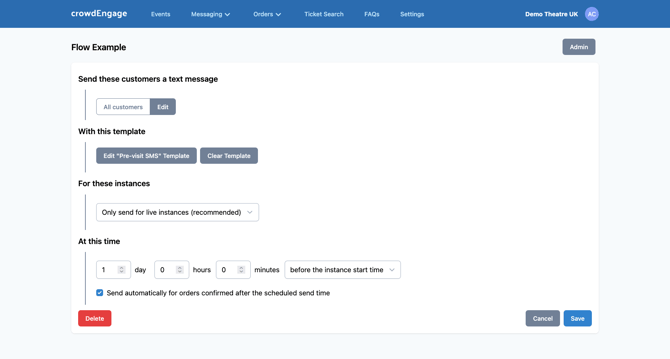
Target a group
- Click Edit on the criteria panel. crowdEngage shows a list of common criteria — ticket type, seating area, and more.
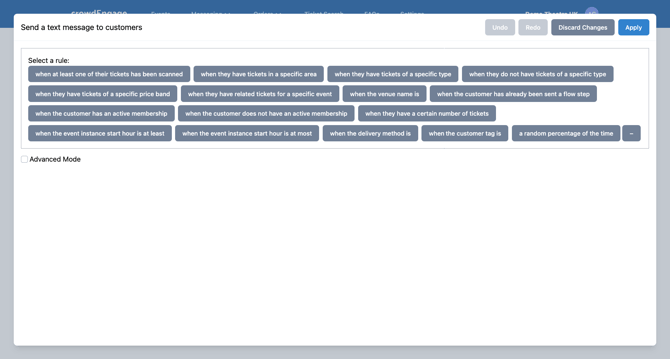
- Pick a critera, then narrow it to the exact group you want.
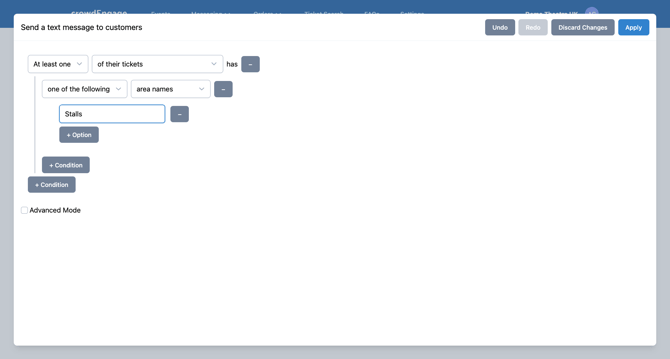
Example — only the stalls: choose seating area, set it to the stalls. The message now goes only to customers seated there.
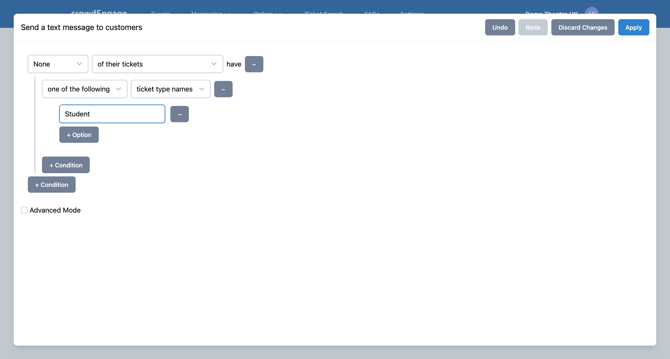
Example — everyone except students: choose ticket type, exclude the student type. Everyone booked gets it except student ticket holders.
The golden rule for criteria building:
Your criteria value must match your ticketing system exactly. Same spelling, same casing, no trailing spaces. crowdEngage pulls the data straight from your ticketing system, so "Student " with a stray space won't match "Student." If a rule targets nobody (or everybody), a typo or a mismatch against the ticketing system is almost always why. Check the source value first. It might be easier for you to copy and paste to avoid typos.
Beyond these examples
Ticket type and seating area are just the start, criteria can be built around most attributes crowdEngage can read from your ticketing system, including customer tags and constituencies (see Use customer tags / constituencies). The same builder targets FAQs and menus, so you can show a menu only to one area, or an FAQ only to matinees. If you can't find the attribute you need, get in touch — support@encorepro.com.
If it's not working
- Nobody matched / everybody matched. Value doesn't match the ticketing system exactly — check spelling, casing, trailing spaces at the source.
- The attribute you want isn't listed. It may not be one crowdEngage pulls for your ticketing system yet. Contact support.